
The problem nobody talks about
There are more than 30,000 business management software tools on the market. Thirty thousand. And most businesses choose theirs because "a friend uses it" or because it came up first on Google.
The result is predictable: 39% of Spanish SMBs still manage their finances with Excel. Not because Excel is good for that — but because every attempt to change to "something better" ended in frustration, half-used tools, or subscriptions nobody remembers to cancel.
The problem isn't that there aren't enough options. It's that there are too many. And without a decision framework, choosing software becomes an act of faith.
This guide won't recommend a specific tool. It will give you a framework to choose the right one — the one that fits your business today and grows with you tomorrow.
The reality of digitalization in business
Before choosing anything, it's good to know where we stand. The numbers from industry reports paint a clear picture:
- 87%SMBs with software
- Use some digital tool
- 39%Still use Excel
- To manage business finances
- 40%Without digital transformation
- Haven't tackled digitalization
In other words: most businesses have software, but not necessarily the right one. Having a CRM you use at 15% isn't digitalization — it's waste.
And the most revealing number: a company with 10 to 100 employees spends between 250,000 and 1 million dollars per year on software, spread across 50 to 70 different applications. It's not that they don't invest in tools. It's that they invest poorly: fragmented, duplicated, unintegrated.
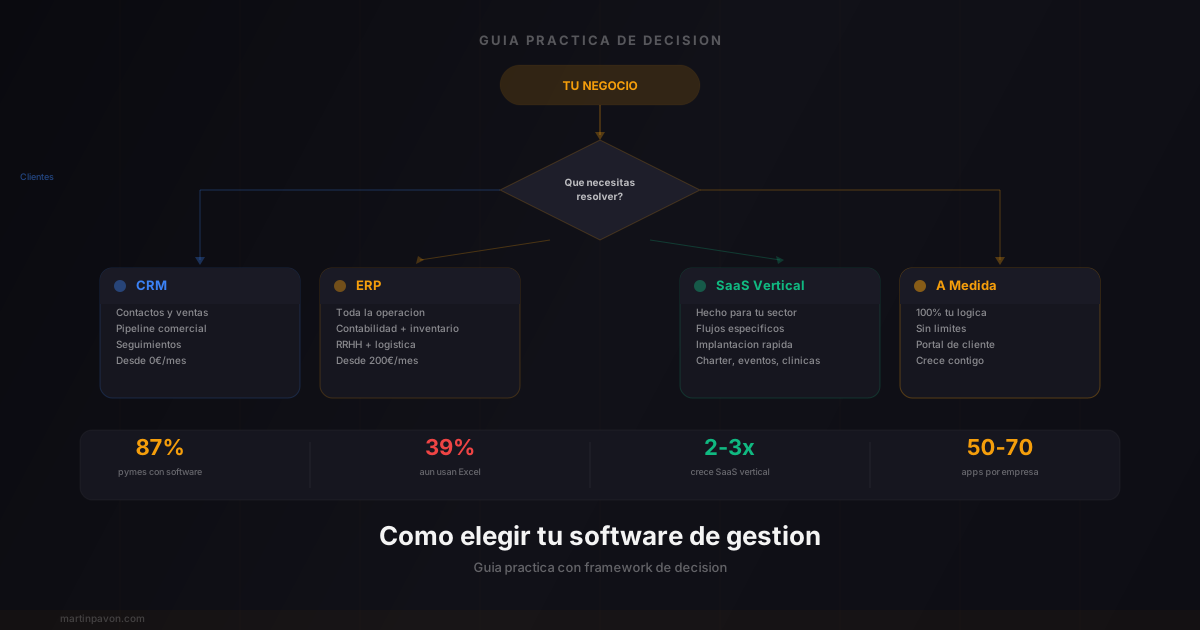
The 4 types of business management software (and when you need each)
Not all software is the same, and using the wrong category is the most common mistake. Here's the real classification:
CRM
Manages customers and sales
- Contacts, follow-ups, pipeline
- Ideal for: sales teams, service businesses
- Start here if your problem is losing customers
- From 0 euros/month (free options)
- Examples: HubSpot, Pipedrive, Monday
ERP
Manages your entire operation
- Accounting, inventory, HR, logistics
- Ideal for: manufacturing, distribution, +50 employees
- Only if operational complexity justifies it
- From 200 euros/month
- Examples: SAP, Odoo, Dynamics
Vertical SaaS
Designed for your industry
- Speaks the language of your industry
- Workflows specific to your business included
- Ideal for: yacht charter, hospitality, clinics, events
- Implementation time: days/weeks
- Examples: TheCharterPanel for charter, GestorSalon for events
Custom software
Built for you
- 100% adapted to your business logic
- No limits on functionality
- Ideal for: when no SaaS covers your case
- Larger initial investment, medium-term ROI
- Includes dedicated customer portal
The 5-Step Framework for Choosing Management Software
Most businesses skip this process and end up switching tools 18 months later. Do it right the first time:
- Define the problem, not the solution — Write down in one sentence what is costing you the most time or causing the most errors. Not "I need a CRM" — "I lose 3 hours weekly searching for client status across email and WhatsApp."
- List your non-negotiables — Identify 3–5 features your business cannot operate without. Everything else is a nice-to-have.
- Shortlist by category fit — Choose between CRM (customer focus), ERP (operational complexity), vertical SaaS (industry-specific), or custom (unique requirements). Our CRM vs ERP guide helps here.
- Test with real workflows — Do not just watch demos. Set up a trial and run your 3 most common daily processes through the tool. If it requires workarounds, eliminate it.
- Calculate total cost, not subscription cost — Add migration time, training, customization, and integration costs. 39% of SMBs underestimate implementation costs by more than 50%.
According to Gartner's software buying research, companies that follow a structured selection process are 2.4x more likely to report high satisfaction with their software 2 years later.
The decision framework in 5 steps
After years building management solutions for different industries, we distilled this process. It works for any business size.
How to choose your management software
- 🎯
Define the problem, not the solution
Don't search for "a CRM." Search to solve "I'm losing customer follow-ups" or "I don't know how much I'm invoicing per month." The problem dictates the tool, not the other way around.
Exercise: Write down the 3 tasks that take the most time each week. Those are your priorities.
- 📋
Map your actual workflow
Before evaluating anything, document how you work TODAY. Not how it should be — how it is. Each step, each tool, each person involved.
You'll discover two things: where the bottlenecks are, and how many tools you use for a single process. If it's more than 2, you have a fragmentation problem.
- 📊
Classify your need
Use this simple rule:
- "I need to organize customers and sell more" → CRM
- "I need to control inventory, accounting, and production" → ERP
- "My industry has workflows no generic software covers" → Vertical SaaS
- "I need something that doesn't exist on the market" → Custom software
If you're torn between CRM and ERP, we have a detailed guide.
- ⚖️
Evaluate with criteria, not demos
Demos are theater. Every software looks good in a 30-minute demo. Instead of being impressed, evaluate with these criteria:
- Adaptability: Does it adapt to your workflow or do you adapt to it?
- Integration: Does it talk to the tools you already use?
- Scalability: Does it grow with you or will it be limited in 2 years?
- Support: Is there someone on the phone when it breaks on Friday at 6pm?
- Total cost: Add subscription + implementation + training + migration. Not just the monthly price.
- 🚀
Start small, measure, and grow
Don't digitalize everything at once. Choose the process that hurts most, implement a solution for THAT, measure the impact in 30 days, then move to the next.
Implementations that fail are ones that try to solve everything at once. The ones that work start with one thing and do it well.
The 5 errors that sink implementations
More than 70% of companies that change software don't get the expected results. Not because the software is bad — but because of these errors:
Error 1: Buy first, define later
Error 2: Choose by trend, not by need
Just because everyone uses Notion doesn't mean Notion is what your business needs. Trendy tools solve generic problems. Your business might have specific problems that require specific solutions.
Error 3: Don't involve the people who'll use it
A tool only works if the person who uses it daily understands it and wants to use it. Choosing software without consulting your sales team, administration, or production guarantees resistance, duplication, or abandonment.
Error 4: Ignore migration costs
The new tool costs 50 euros/month. Perfect. But migrating data, training the team, configuring workflows, and losing productivity during the transition could cost 10 times more than the annual subscription. Always include migration in your budget.
Error 5: Don't measure results
You implement a new tool and... that's it. Nobody measures if it actually saved time, if the key features are being used, if customers notice the difference. Without metrics, you don't know if the investment was worth it — and you repeat the same cycle every 2 years.
Software Selection: What the Data Shows
Research consistently shows these patterns across SMB software decisions:
- Businesses that follow a structured selection process are 2x more satisfied with their software at the 2-year mark
- The average SMB evaluates 4 a 6 opciones before making a final decision — but only demo 2 with real workflows
- Switching software costs an average of 3 months of reduced productivity during the transition period
- Companies that define their requirements upfront spend 2x less time in implementation vs those that wing it
- The hidden cost of the wrong tool: teams spend an average of 2 hours daily on workarounds for software that doesn't fit
Does your current software serve you? The quick test
Software Health Check
Answer each question about your current tool
Do you use less than 30% of available features?
Si si → You're paying for something you don't need. You probably need something simpler or more specific.
Do you need 3 or more tools for a single workflow?
Si si → Classic fragmentation. Data gets lost between systems and tasks get duplicated.
Does your team have workarounds or hacks to cover what the software doesn't do?
Si si → The software doesn't speak your business language. You're adapting to it instead of the other way around.
Do you lose more than 2 hours weekly on repetitive manual tasks?
Si si → Those hours are automatable. Your current tool isn't doing its job.
Can't your customers see the status of their project without contacting you?
Si si → You're missing a customer portal. That directly affects experience and retention.
Tu puntuacion
The trend is clear: vertical and specialized
The market is speaking. Vertical SaaS — software designed for specific industries — is growing 2 to 3 times faster than generic horizontal software. The vertical SaaS market will reach 369 billion dollars in 2033, with annual growth of 16%.
- 2-3xGrowth vs generic
- Vertical SaaS grows double or triple
- 60%SMBs in vertical
- Already use industry-specific SaaS
- $369BMarket 2033
- Projected size of vertical SaaS
Why? Because software that understands your industry doesn't need you to explain your business. A yacht charter management system knows what a boat, a season, and a crew are. An event manager knows what a menu, an RSVP, and a contract are. You don't need to "adapt" anything — it already comes built for you.
It's the difference between a one-size-fits-all suit and a custom-tailored one. Both dress you, but only one fits perfectly.
The best software isn't the most famous or the most expensive. It's the one that solves YOUR problem with the least effort possible.
The decision at a glance
| Your situation | What you need | Example |
|---|---|---|
| Under 10 employees, disorganized sales | Basic CRM | HubSpot Free, Pipedrive |
| 10-50 employees, mixed operation | CRM + vertical tools | CRM + industry SaaS |
| Over 50 employees, complex logistics | ERP | Odoo, SAP Business One |
| Industry with unique workflows | Vertical SaaS | TheCharterPanel for charter, GestorSalon for events |
| Needs no SaaS covers | Custom software | Personalized solution |
The key isn't finding perfect software — it's finding the one that fits your business today and has room to grow with you tomorrow.
Don't know where to start? Let's talk. We can help you map your situation and find the right solution.