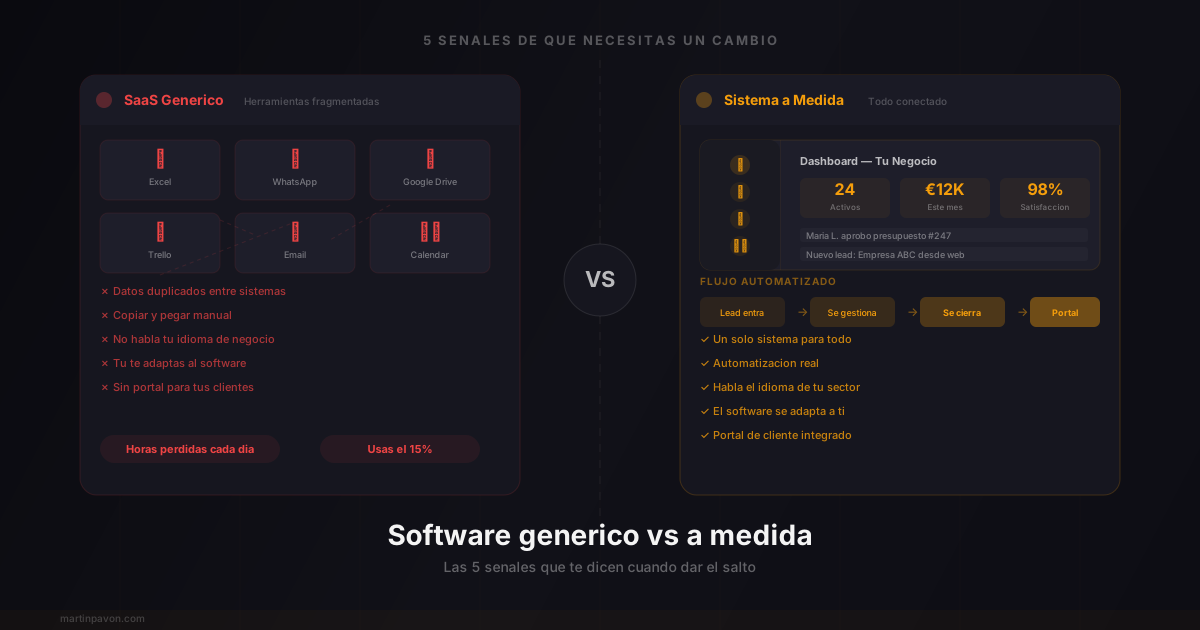

The trap of generic software
There comes a point in every business's life when the tools you use stop helping you and start holding you back. It's not that they're bad tools. It's that they weren't designed for YOUR business.
That CRM that promised to organize everything but you use at 15%. That spreadsheet that started as "something temporary" two years ago. That SaaS that almost does what you need... but not quite.
Generic software solves generic problems. Your business isn't generic.
The question isn't whether you need technology — you already know you do. The question is: do you need a system built for you, or can you keep adapting to tools that weren't designed for what you do?
Here are the 5 signs that answer it.
1. You use 3 or more tools for a single process
How it looks in practice:
- You receive a lead by email → copy it to an Excel file → create a task in Trello → message them on WhatsApp → note the result in another spreadsheet
- Each step is an opportunity for error. Each tool has its own logic. Nothing talks to anything else.
- Your team loses 2-4 hours a day copying data from one place to another
What should happen: A single system where the lead enters, gets managed, is followed up on, and is closed. No copying. No jumping. No praying that nobody forgets to update the spreadsheet.
- 67%Companies affected
- Use 4+ tools for a single workflow
- 2-4hTime lost per day
- Copying data between systems
- 23%Errors from duplication
- Inconsistent data across platforms
2. You adapt your business to the software (not the other way around)
This is the most damaging sign and the hardest to detect, because it happens gradually.
You start using a tool. At first it fits reasonably well. But as your business grows, you start noticing things:
Symptoms of forced adaptation:
- You invent "creative" fields to stuff information that doesn't have its own space
- You have a process you can't do in the tool, so you do it outside
- Your team has created "workarounds" and "hacks" that only they understand
- Every time someone new arrives, they need a week to understand "how we actually use this"
- You've asked the provider for a feature and they said "it's on the roadmap" two years ago
The underlying problem: When you adapt your business to the software, you're sacrificing your competitive advantage. Your unique way of working — that's what differentiates you — dilutes into a generic mold.
If the software dictates how you work instead of facilitating how you already work, it's not a tool. It's a limitation.
What should happen: The software adapts to your workflow, not your workflow to the software. Your business rules, your exceptions, your way of doing things — encoded in a system that understands them.
3. You have manual tasks that should be automated
What you do today
- You manually send confirmation emails
- You copy data from a form into your system
- You generate reports by pulling data from 3 different places
- You remember follow-ups with sticky notes or phone alarms
- You update statuses by hand in 2+ places
What should happen
- Confirmations send automatically when a condition is met
- Data enters directly where it needs to go
- Reports generate themselves with real-time data
- The system alerts you when you need to act
- A change in one place reflects everywhere
Automation isn't a luxury for big companies. It's what separates a business that scales from one that stalls.
The rule is simple: If you do something more than 3 times a week and it always follows the same steps, it should be automated. If it's not automated, you're paying with your time what technology should be paying.
4. Your tool doesn't speak your industry's language
Every industry has its own jargon, its own workflows, and its own rules. A generic CRM doesn't know what a "high season" is in yacht charter, that an "event" at a venue has 47 pending decisions, or that a dental patient has a treatment plan with phases.
Concrete examples:
What generic software doesn't understand
- ⚓
Yacht charter
A CRM has no concept of "boat," "crew," "itinerary," or "season." You end up with free-text fields where you cram everything and then can't filter, search, or automate anything.
- 🎪
Event venue
A project management tool doesn't know that an event has a menu, guests, vendors, setup, and teardown. Each event is unique, but they all follow similar logic that generic software doesn't capture.
- 🏥
Clinic or practice
An appointment manager doesn't understand treatment phases, medical histories, consents, or post-visit follow-up. You need something that speaks the language of healthcare, not generic productivity.
- 🔧
Workshop or technical service
Work orders, parts, diagnostics, customer budget approval, vehicle history... none of this exists in a standard task management tool.
When the software speaks your language, everything changes. You don't need to "translate" your reality to fit generic categories. The entities, statuses, and workflows reflect exactly how your business works.
5. You can't give your customers the experience they expect
This is the sign with the biggest impact on your revenue.
Your customers expect a smooth digital experience. They want to see their order status, approve a quote with one click, access their documents without calling you. And if your current tool doesn't let you give them that, you're losing to whoever can.
- 73%Customers
- Expect digital experiences from their vendors
- 3xMore retention
- In businesses with customer portals
- -60%Status inquiries
- When the customer can see everything online
A dedicated customer portal — where each customer sees their status, their documents, their history — isn't something a generic SaaS will give you. Because every business needs a different portal.
Key Statistics: The Real Cost of Generic Software
The productivity data is consistent across industries:
- Teams using 3+ tools for a single process lose an average of 4 hours daily copying data between systems
- After switching to a unified custom system, businesses recover 2 to 3 hours per team member per day
- 67% of companies report that fragmentation is their top operational inefficiency
- The average SMB pays for 5 tools that partially overlap in functionality
- Businesses that consolidate their stack report closing 2x more deals with the same team size
The diagnosis: how many signs do you check?
Custom software test
Answer honestly
Do you use 3+ tools for a single process?
Si si → Fragmentation is costing you hours and errors every week.
Have you adapted how you work to the software?
Si si → You're sacrificing what makes your business unique.
Do you have repetitive manual tasks that should be automatic?
Si si → Every manual task is time you could invest in growth.
Doesn't your tool understand your industry?
Si si → You're translating your reality into a language that isn't yours.
Can't you give your customer the digital experience they expect?
Si si → This directly impacts retention and revenue.
Tu puntuacion
The 5 Signs: Quick Checklist
Before diving into each sign in detail, here is the fast self-diagnostic. Answer honestly:
- Do you use 3 or more separate tools for a single end-to-end process?
- Has your team built workarounds because the software can't handle your actual workflow?
- Are there repetitive tasks you execute manually every week that follow identical steps?
- Does your software not understand the entities or terminology specific to your industry?
- Can you not give clients real-time visibility into their project or order status?
67% of SMBs report using 4 or more disconnected tools for a single business process — each handoff a potential point of failure. If you checked 3 or more, the hidden cost of staying with generic tools almost certainly exceeds the cost of switching.
Generic SaaS vs Custom Software: True Cost Comparison
Most cost comparisons only look at subscription fees. This table shows the full picture:
| Factor | Generic SaaS Stack (4–6 tools) | Custom Software (Subscription) |
|---|---|---|
| Monthly cost | USD 300–800 | USD 200–500 |
| Setup time | Days (but months of real adaptation) | 2–4 weeks |
| Process fit | 60–70% of your actual workflow | 90–95%+ |
| Vendor lock-in | High — data across multiple silos | Low — you own the data |
| Support | Generic ticket queue | Dedicated, knows your system |
| Scalability | Pay per seat, per tool | Fixed or usage-based |
According to Gartner research on software consolidation, companies that consolidate fragmented SaaS stacks reduce total software spend by 20–30% on average — while getting better process coverage, not worse.
"But custom software is incredibly expensive and takes years"
No. That was true a decade ago.
Before (2015)
- 6-12 months of development
- Teams of 5-10 people
- Budgets of 50,000-200,000 euros
- Fixed requirements from day one
- If something changes, rewrite everything
Now (2026)
- Weeks, not months
- Smaller teams with advanced tools
- A fraction of the historical cost
- Constant iteration: start simple and grow
- Adapts as your business evolves
The reality is that building custom software today is faster, cheaper, and more flexible than ever. What used to require a team of 10 people for a year can now be done in weeks with the right tools and methodologies.
And most importantly: you don't need everything on day one. Start with the main problem — that workflow that hurts the most — and then grow organically.
How to know if it's time
You don't need a 50-page plan or a six-figure budget. You need to answer one question:
If you could have ONE system that does exactly what your business needs, what would it do?
If the answer comes to you in less than 30 seconds — if you know exactly what you're missing, what frustrates you, and what you'd automate — then you already have your answer.
Generic software was a good starting point. But your business isn't at the starting point anymore.
It's time to have the system your business deserves.
If you're still not sure what type of tool you need, start with our practical guide to choosing business management software. It will help you classify your need before making a decision.