
The problem we all know
You have the business running. Customers in WhatsApp, sales in an Excel spreadsheet you no longer understand, and every week you lose time figuring out who owes you what, which order is pending, who needs to be called.
This sounds familiar, right?
Then someone tells you: "you need a CRM." Another tells you: "what you need is an ERP." And you're left thinking: but what's the difference?
CRM: Your customer contact list with superpowers
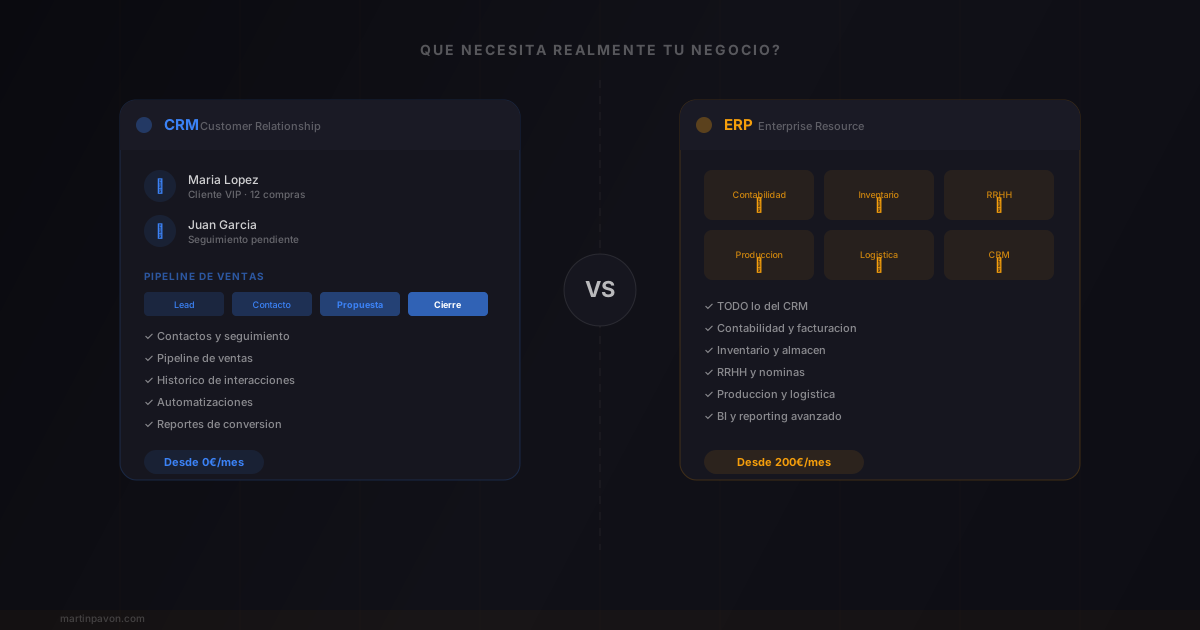
A CRM (Customer Relationship Management) does exactly what it says: manages your customer relationships.
In practice, that means:
- Know who each customer is — name, contact, purchase history, preferences
- Follow the sales process — what stage each opportunity is at, who needs to do what
- Never forget anything — reminders, automatic follow-ups, shared notes
- Measure results — how many sales you close, where they come from, what works and what doesn't
Think of it as your contact list but that remembers everything and alerts you when you need to act.
Well-known examples: HubSpot, Salesforce, Pipedrive, Monday CRM.
ERP: Your company's brain
An ERP (Enterprise Resource Planning) goes much further. It manages your entire business operation:
The modules of an ERP:
- Accounting and invoicing — invoices, payments, taxes, balance sheets
- Inventory and warehouse — stock, supplier orders, logistics
- Human resources — payroll, vacations, contracts
- Production — work orders, materials, planning
- And yes, also CRM — customer management is usually one more module
It's like having a central nervous system for your entire company. Everything connected, everything in one place.
Well-known examples: SAP, Oracle, Odoo, Microsoft Dynamics.
The big difference at a glance
CRM
- Manages customers and sales
- Focus on customer relationships
- Quick to implement (days/weeks)
- From 0€/month (HubSpot Free)
- Ideal for teams of 1-50 people
- Low learning curve
ERP
- Manages entire operation
- Focus on internal processes
- Slow to implement (months)
- From 200-500€/month
- Necessary with +50 people
- High learning curve
So, what do you need?
This is where most articles tell you "it depends." I'm going to be more direct.
Quick decision guide
- 🎯
Less than 10 employees, less than 500K/year
You need a CRM. Period. Your problem right now isn't controlling inventory or automating payroll. Your problem is not losing customers and selling more. A CRM solves that.
An ERP at this scale is overkill.
- 📊
10-50 employees, mixed operations
Start with a CRM if you don't have one. Then evaluate if you need ERP modules for accounting or inventory.
Many businesses at this stage work fine with a CRM + specialized tools. You don't need everything in one system.
- 🏗️
+50 employees or complex logistics
Here an ERP makes sense. Operational complexity justifies the investment. But even here, implement in phases — don't try to digitalize everything at once.
What I learned building TheCharterPanel
When I started building software for yacht charter companies, I saw exactly this pattern. Companies with 5-15 boats trying to implement massive systems they didn't need.
What they really needed was to know:
What's essential for a charter company:
- Who has booked which boat
- What preferences each customer has
- When the deposit needs to be paid
- Which crew members are available
That's a CRM with specific business logic. Not an ERP.
CRM vs ERP: The Performance Numbers
The business impact data for both tools:
- Companies using a CRM report closing 29% more deals — but only when the CRM is used consistently by the full team
- A well-configured CRM saves sales teams 2 to 3 hours per week on manual follow-up and data entry
- ERP implementations for businesses under 50 people typically take 6 to 9 months to fully adopt
- Businesses that start with a CRM and add ERP later report 3x smoother ERP adoption than those who jump straight to ERP
- The average SMB that replaced Excel with a CRM recovered ROI in 45 days — tracked in recovered time alone
Practical rule: the 3 signs
You need a CRM if...
- You lose follow-ups — customers you forget about, opportunities that go cold
- You don't know where your sales come from — you can't measure which channel works
- Your team has no visibility — each person has their own contact list
You need an ERP when...
- Inventory gets out of control — you don't know what you have, what's missing, what's extra
- Accounting is a mess — reconciling invoices takes days
- Processes overlap — a sale affects inventory, logistics, and billing
CRM vs ERP: Head-to-Head Comparison
| Dimension | CRM | ERP |
|---|---|---|
| Primary focus | Customer relationships and sales | End-to-end business operations |
| Modules | Contacts, pipeline, follow-ups, marketing | Accounting, inventory, HR, logistics, production |
| Team size fit | 1–50 employees | 50+ employees (typically) |
| Implementation time | Days to weeks | Months |
| Starting cost | USD 0/month (HubSpot Free) | USD 200–500/month minimum |
| Learning curve | Low | High |
| Return on investment | Visible in weeks | Visible in months to years |
| Includes CRM? | Yes, that is what it is | Usually as one module |
According to HubSpot's State of Sales report, companies using a CRM see 29% higher sales revenue and 34% higher sales productivity compared to those managing customers in spreadsheets.
The 3-Question Decision Framework
Answer these in order — stop as soon as you have your answer:
- Is your primary pain point losing customers, forgetting follow-ups, or not knowing where your sales stand? → Start with a CRM. You do not need an ERP yet.
- Do you have 50+ employees with complex inventory, logistics, or payroll that a CRM cannot handle? → Add ERP modules to your existing CRM, or evaluate a full ERP.
- Does your industry have specific workflows that neither a standard CRM nor a standard ERP covers? → Consider vertical or custom software built for your sector.
29% of SMBs that invest in a CRM see measurable revenue growth within 90 days — the fastest ROI of any business software category. ERPs take 12–24 months to deliver measurable return.
The most common mistake
Start simple. A free or cheap CRM. Organize your customers, your sales, your follow-ups. When that system becomes insufficient — and you'll know because you'll use it every day — then scale.
Conclusion
- CRMManage customers
- For most businesses, it's the first step
- ERPManage the company
- When complexity justifies it
- CRMStart here
- Always. Even if you think you need ERP
Technology should solve real problems, not create new ones. And the real problem for most businesses isn't that they lack a complex system — it's that they don't have the basics organized.
Organize the basics first. The rest follows naturally.
If you want a more complete guide on all types of management software — not just CRM and ERP — read our practical guide to choosing business management software.